
Get Paid Same Day: Accept Credit Card Payments for Trades

Your fastest path to getting paid is a mobile terminal for on-site jobs, hosted checkout or pay-now links for anything remote, and a virtual terminal for phone orders. For most trades crews, the smart starting combo is a mobile card reader plus pay-now links sent straight from an invoice, since both cut down on paperwork and speed up cash flow. Some business software can help by attaching payment links directly to the job and invoice, so nothing gets lost in the shuffle.
TL;DR:
- Mobile card readers paired with pay-now links are the most cost-effective and efficient way for trades crews to get paid quickly on-site or remotely.
- Card-present transactions cost less and carry lower fraud risk compared to card-not-present methods, which involve higher fees and chargeback risks.
- Using P2PE-certified terminals with reliable connectivity and proper software integration simplifies PCI compliance and reduces security risks.
- Surcharging credit card fees is allowed in most provinces at under 2.4%, but must be clearly disclosed and is not permitted in Quebec; debit cards cannot be surcharged.
- Connecting payments directly to job management software like Forge minimizes bookkeeping chaos by automating invoice and payment reconciliation.
Table of Contents
- How do trades businesses accept credit card payments?
- What hardware and software do you need for card payments?
- What fees come with accepting card payments?
- How do you set up card payments step by step?
- What is PCI compliance and how do you meet it easily?
- How do you collect payment on-site without chasing invoices?
- How do card payments affect your bookkeeping?
- How Forge helps trades businesses accept payments and simplify reconciliation
- How do chargebacks and disputes actually work?
- How do popular payment processors compare for trades?
- Can card payments connect to your accounting software?
- Forge: keep payments connected to the job, not floating in a separate app
- Sources
- FAQ
How do trades businesses accept credit card payments?
There isn’t one right answer here. It depends on where the work happens and how your crew operates day to day.
The starting point is understanding card-present versus card-not-present transactions. Card-present means the customer’s physical card (or phone tap) is used right at the point of sale, like a technician swiping a reader after fixing a furnace. Card-not-present covers phone payments, online invoices, and pay-now links where the card never physically shows up. This distinction matters because it drives your processing costs and your fraud exposure. Card-present transactions are cheaper to process and carry less fraud risk, because the processor can verify the card is real. Card-not-present transactions cost more and carry higher chargeback risk, since there’s more room for someone to dispute a charge later.
For trades, this plays out in practical ways:
- Mobile terminals work best for technicians who finish a job and want payment before they drive away. Fast, card-present, and it avoids chasing an invoice later.
- Countertop POS systems suit a storefront, like a landscaping supply shop or an HVAC parts counter, where customers walk in and pay at a fixed spot.
- Hosted checkout or pay-now links fit remote invoicing, deposits, or when a customer wants to pay from their phone after the job’s done.
- Virtual terminals handle phone orders, useful for dispatch teams booking service calls and taking a deposit over the phone.
Each has trade-offs. Mobile terminals need a device and connectivity in the field. Hosted checkout removes hardware costs but adds a small card-not-present fee. Countertop systems are reliable but useless if your business is mostly mobile. The right mix usually comes down to matching the tool to where the payment conversation actually happens.
What hardware and software do you need for card payments?
Picking the right setup isn’t about chasing the newest gadget. It’s about matching tools to how your crew actually works.
Hardware checklist:
- P2PE-certified terminal (point-to-point encryption). This protects card data the instant it’s swiped or tapped, so you’re not storing sensitive numbers on your own devices.
- Connectivity that matches your job sites. Cellular-connected terminals work in basements and rural properties where Wi-Fi is unreliable; Wi-Fi-only units are fine for a fixed shop location.
- Battery life built for a full day. A crew running four to six jobs needs a terminal that survives the shift without a midday charge.
- Printer or e-receipt option. Some customers still want a paper slip; others prefer an emailed or texted receipt.
- Bilingual receipt support, especially if you do work in Quebec or serve a mixed-language customer base.
Software choices split into a few lanes: hosted checkout pages (simplest, lowest PCI burden), direct gateway integration (more flexible, more setup), pay-now links attached to invoices, and a virtual terminal for taking card details by phone.
Pro Tip: If you run a solo operation, a single mobile terminal paired with pay-now links covers almost everything you’ll need. Save the gateway integration and multi-user dashboards for when you’ve got three or more techs in the field.
Match your setup to your crew size: a solo electrician needs one reliable mobile reader. A five-truck HVAC company needs a terminal per technician plus a shared dashboard to see who’s collected what. A multi-site landscaping business might run countertop POS at the yard and mobile terminals for crews on client properties.
What fees come with accepting card payments?
Processing fees usually break down into three pieces: a percentage of the sale, a flat fee per transaction, and a monthly account fee. On top of that, expect chargeback fees if a customer disputes a charge, and possibly a terminal rental or purchase cost depending on the provider.
Card-present transactions, like a mobile terminal on-site, typically cost less than card-not-present ones, since the processor takes on less fraud risk when the card is physically there. That’s one more reason mobile terminals in the field often make more financial sense than mailing invoices and waiting for an online payment.
Common fee components to budget for:
- Percentage rate per transaction (varies by card type and how the card was presented)
- Flat per-transaction fee, often a few cents
- Monthly account or gateway fee
- Chargeback fee if a dispute goes against you
- Terminal cost, either a one-time purchase or a monthly rental
Surcharging is where a lot of trades owners get tripped up. In most Canadian provinces, you’re allowed to add a surcharge for credit card use, but it’s capped at 2.4% of the transaction or your actual cost of acceptance, whichever is lower. Quebec doesn’t allow surcharging at all, and debit cards can never be surcharged regardless of province. If you do surcharge, it has to be disclosed clearly on your invoice or quote before the customer pays, not buried in fine print. The Financial Consumer Agency of Canada outlines merchant obligations and complaint processes if a customer challenges how a surcharge was applied.
How do you set up card payments step by step?
Getting from zero to accepting your first payment doesn’t have to eat up your week. Here’s the order that works:
- Gather your documents. You’ll need your business number, a business bank account for deposits, government ID, and a short description of what your business does.
- Apply with a processor or payment provider. Approval timelines vary a lot. Some platforms offer instant approval, while others take one to seven business days depending on how much manual review they require.
- Set up your hardware or hosted checkout. Configure receipt language (English, French, or both), tax settings for GST/HST, and your settlement bank account.
- Enable pay-now links or virtual terminal access if you plan to invoice remotely or take phone payments.
- Run a $1 test transaction. Confirm it processes, appears in your dashboard, and settles into your bank account on schedule.
- Test a refund. Make sure you know how to reverse a charge before you actually need to.
- Complete any required compliance forms, including your PCI self-assessment questionnaire (more on that next).
Once that test transaction clears and shows up in your bank account, you’re live. Most trades owners can go from application to first real payment inside a single business day if they use a provider with fast approval.
What is PCI compliance and how do you meet it easily?
PCI DSS is mandatory for any business that stores, processes, or transmits cardholder data, but the good news is most small trades businesses can meet the simplest tier. If you use a hosted checkout page or a P2PE-certified terminal, card data never actually touches your systems. That commonly qualifies you for SAQ A, the lightest self-assessment questionnaire, which small businesses using hosted pages can typically complete in about 15 to 20 minutes.
Practical steps to keep your PCI scope small:
- Use hosted payment pages or certified P2PE terminals so card numbers never land on your laptop or phone.
- Never store customer card numbers in a spreadsheet, note, or text message.
- Use tokenization, where the processor replaces the card number with a random code for any repeat billing.
- Keep your point-of-sale software and terminal firmware updated.
- Secure your business Wi-Fi with a strong password and separate it from any public network.
Skipping these steps isn’t just a compliance headache. Processors can fine you or shut down your merchant account if a data breach traces back to sloppy handling. The PCI Security Standards Council maintains the official requirements if you want to check the fine print for your specific setup.
How do you collect payment on-site without chasing invoices?
The best time to get paid is before the truck leaves the driveway. Offer tap-to-pay or a quick pay-now link the moment the job wraps up, while the customer’s still standing there satisfied with the work.
A few habits make this run smoothly:
- Attach the payment to the correct invoice or work order right away, not after you’re back at the shop trying to remember which job was which.
- For split payments or tips, confirm the total out loud before running the card, so there’s no confusion on the receipt.
- Equip every technician with a mobile terminal or the ability to send a pay link by text before they leave the property.
- Verify the payment actually cleared before the crew drives off, especially for larger invoices.
Pro Tip: Make “payment collected” part of your job checklist, right next to “customer sign-off.” If it’s not a required step, it’s the first thing that gets skipped on a busy day.
Collecting on-site turns what would’ve been a card-not-present invoice sent days later into a card-present transaction that settles faster and needs no follow-up. Fewer unpaid invoices, less time spent reconciling who paid what.
How do card payments affect your bookkeeping?
Processors charge GST/HST on their own fees, so treat those processing fees as a regular business expense and keep the statements for your accountant when input tax credits come up.
Reconciling doesn’t need to be complicated if you do it often. A few habits keep your books clean:
- Match every deposit to the invoice it came from, weekly at minimum, so nothing slips through unnoticed.
- Keep documentation on any chargeback, including the original invoice and proof of work completed.
- Hang onto transaction records for the retention period your accountant recommends, since the Canada Revenue Agency can request them during a review.
Card payments create a clear audit trail that lines up directly with your invoices, which is more than you can say for cash paid on the sly with no receipt. That paper trail is one less thing to explain if the CRA ever asks questions about your reported income.
How Forge helps trades businesses accept payments and simplify reconciliation
Getting paid is only half the job. Knowing which invoices are still open, which jobs need a follow-up, and which crew collected what is the other half, and that’s where a lot of trades owners lose track.
Some business software centralizes your customers, quotes, work orders, and invoices in one place, so a pay-now link sent after a finished job connects directly back to the work order it belongs to. No more digging through texts to figure out if the Thompson job on Elm Street actually got paid.
For example, when a technician sends a pay-now link from the truck, the payment can tie back to the original quote and invoice automatically, instead of living in a separate payment app disconnected from the job record. Across a busy week with a handful of crews out on different sites, that view matters. Instead of guessing which invoices are still sitting unpaid, you can see it at a glance and follow up before it turns into a collections headache.
This type of software doesn’t replace your accounting software. It sits alongside it, giving you the operational picture of what’s outstanding across every customer and every job, so your bookkeeper gets clean records and you spend less time playing detective.
How do chargebacks and disputes actually work?
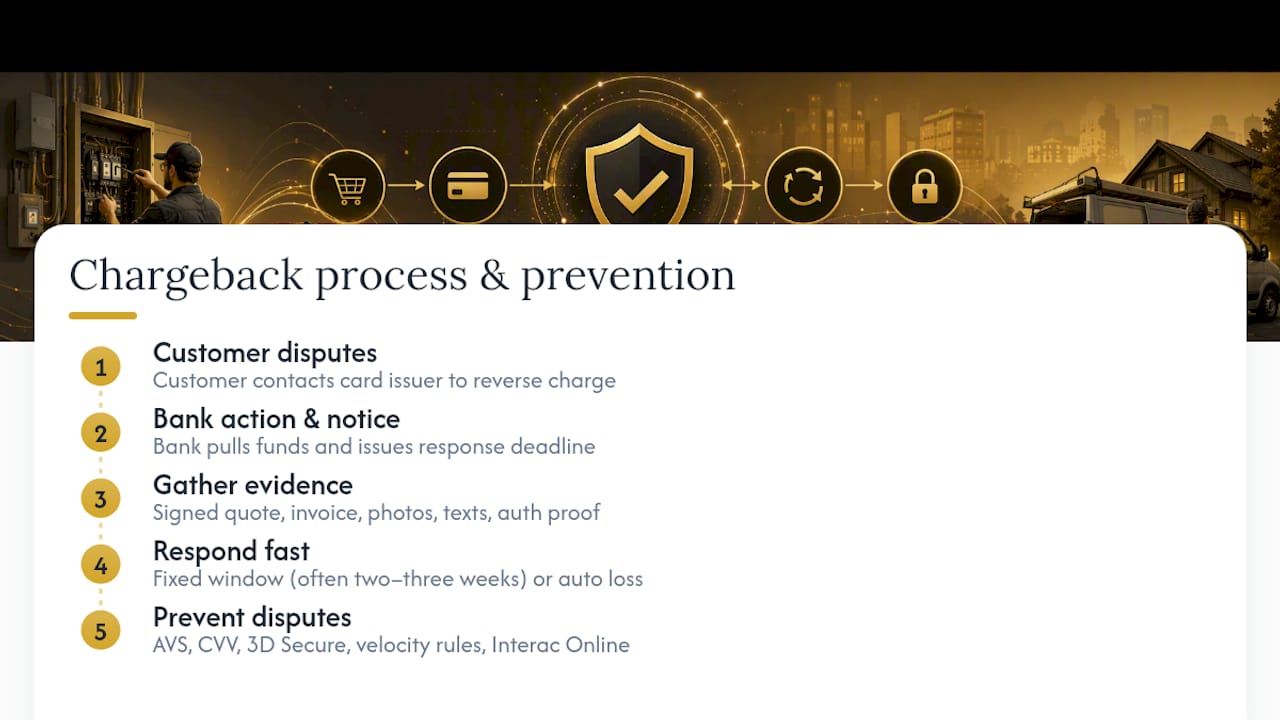
A chargeback happens when a customer contacts their card issuer to reverse a charge, usually claiming the work wasn’t done, wasn’t as described, or that they didn’t authorize the transaction. The bank pulls the funds back from your merchant account while it investigates, and you get a notice with a deadline to respond.
Your job at that point is to provide evidence: the signed quote, the invoice, photos of completed work, texts confirming the customer approved the job, and proof of the payment authorization if it was card-present. Card-present transactions are easier to defend, since a physical card tap or swipe with a signature leaves a stronger trail than a phone payment taken on trust.
Prevention beats disputing after the fact. Practical fraud controls like address verification (AVS), requiring the CVV code for phone or online payments, 3D Secure 2.0, velocity rules that flag unusual repeat charges, and offering Interac Online as an alternative all cut down on the number of disputes you’ll face in the first place.
Respond to a chargeback notice quickly. Most processors give a fixed window, often two to three weeks, and missing it means an automatic loss regardless of how solid your evidence is. Keep a simple folder system, digital or paper, for every job so you can pull proof fast if a dispute lands on your desk.
How do popular payment processors compare for trades?
Processors generally fall into three categories, each with real trade-offs for a trades business.
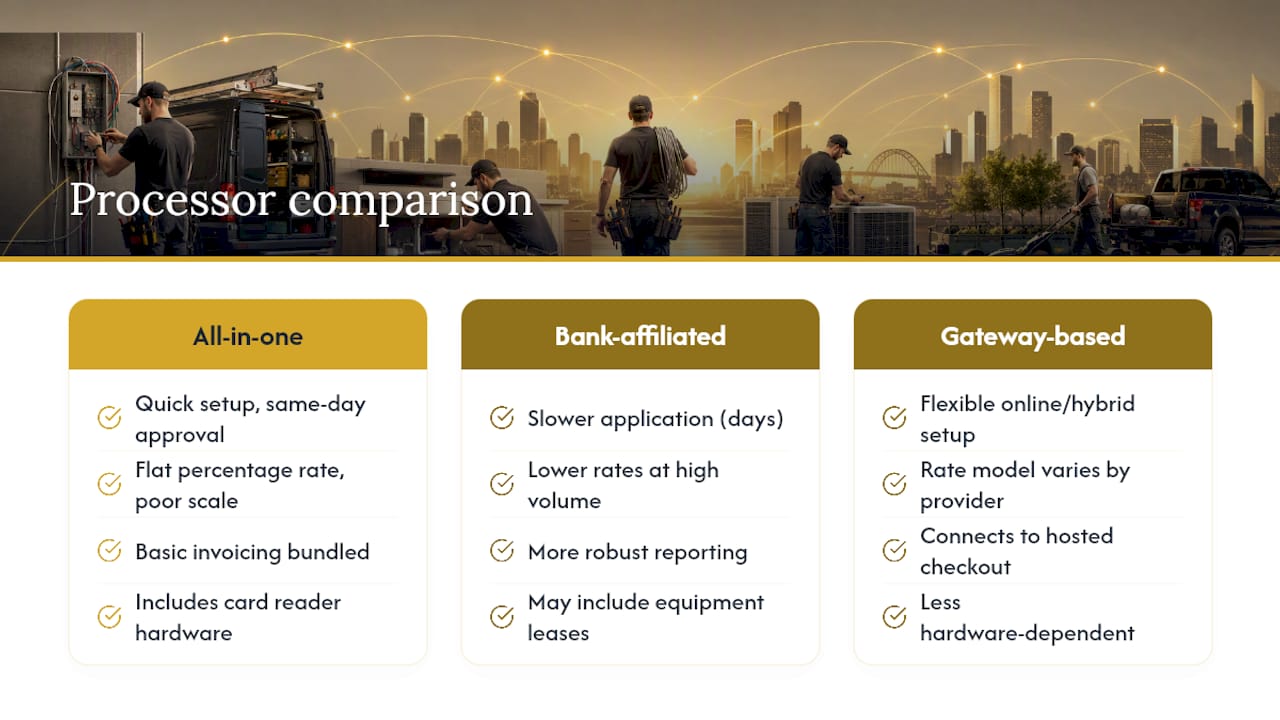
All-in-one mobile-first providers bundle a card reader, app, and basic invoicing into one package. They’re quick to set up, often with same-day approval, and work well for solo operators or small crews. The trade-off is usually a flat percentage rate that doesn’t scale down much as your volume grows.
Traditional bank-affiliated processors tend to offer lower rates at higher volumes and more robust reporting, but the application process is slower, sometimes taking most of a week, and contracts can include equipment leases that are harder to exit early.
Gateway-based processors built for online and hybrid businesses give you more flexibility to connect a hosted checkout page to a website or invoicing tool, which suits a business doing a mix of on-site work and remote deposits.
None of these is universally best. A one-person plumbing outfit doing a handful of jobs a week doesn’t need the same setup as a ten-truck electrical contractor billing large commercial accounts. Match the provider to your transaction volume, your mix of card-present versus remote payments, and how much hands-on support you want during setup, rather than chasing the lowest advertised rate alone.
Can card payments connect to your accounting software?
Most modern payment tools offer some form of integration with accounting or job-tracking software, but the depth of that integration varies a lot. Some processors sync transactions directly into accounting platforms, automatically categorizing fees and deposits. Others require manual export and import, which adds bookkeeping time every week.
For a trades business, the more useful integration often isn’t with accounting software directly. It’s with whatever tool tracks your quotes, work orders, and invoices, so a payment updates the job record the moment it clears. That’s the layer where owners lose the most time. Chasing which invoice matches which bank deposit is a bigger daily headache than categorizing a processing fee.
When evaluating a payments setup, ask whether it plays well with the software you already use to run jobs day to day, not just whether it exports a clean CSV file to your accountant at tax time. A tool that ties payments to the job rather than treating them as a separate transaction log saves real hours over a busy month.
Forge: keep payments connected to the job, not floating in a separate app
Card readers and pay-now links solve how you get paid. Forge solves what happens after: knowing which invoice that payment belongs to, which jobs are still waiting on money, and which customer needs a follow-up before the invoice goes cold.
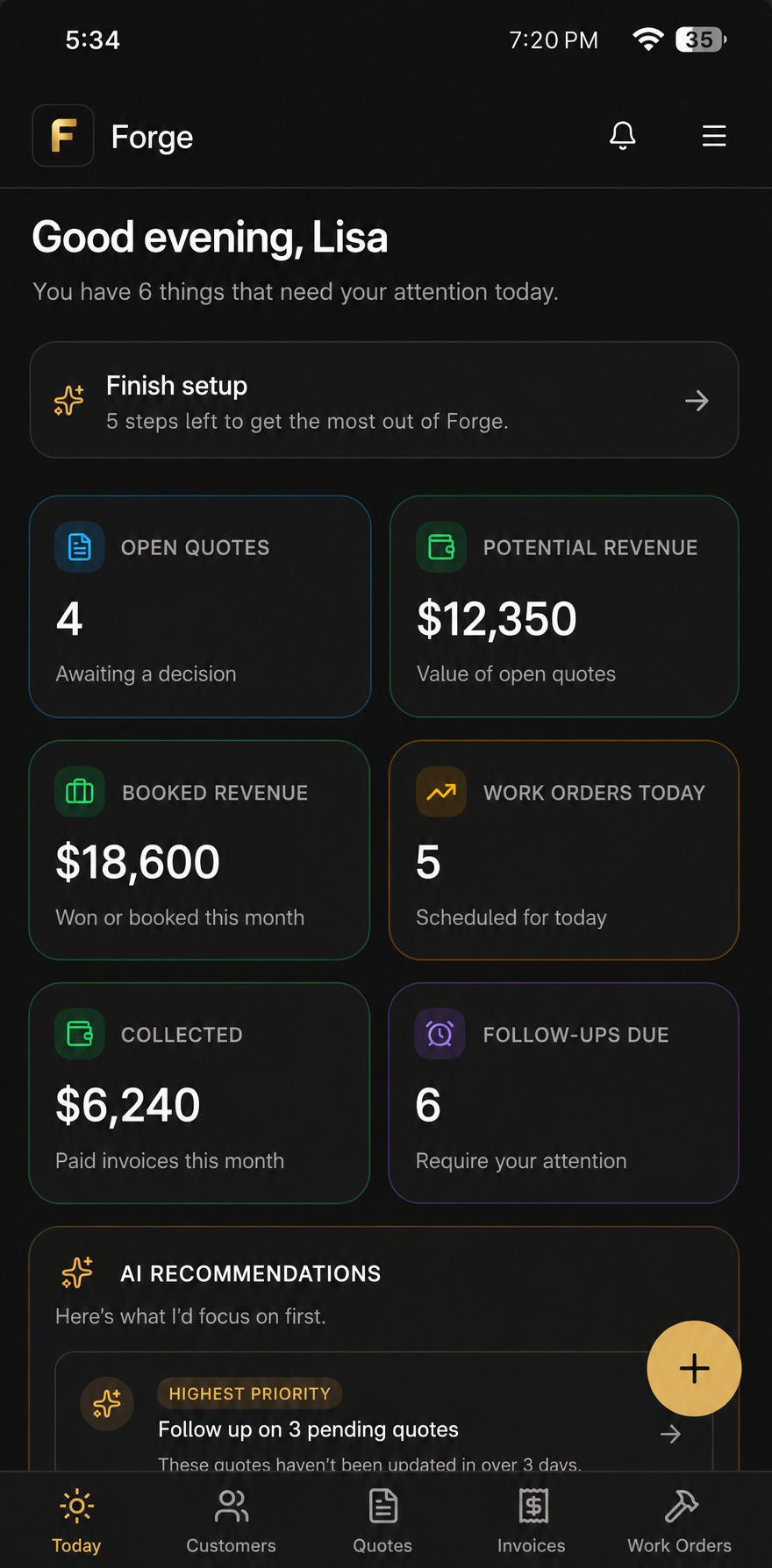
If you’re already juggling quotes, work orders, and invoices across texts and spreadsheets, adding a payment processor on top just creates one more disconnected app to check. Some business software brings customers, quotes, work orders, and invoices into one place, so when a payment link gets sent and paid, it’s tied directly to the job it came from, not sitting in a separate payment dashboard you have to cross-reference by hand.
For a crew running multiple jobs a week, that means one look tells you what’s outstanding, what’s paid, and who needs a nudge. Start a free trial with Forge and see your quotes, invoices, and payments organized in one place from day one.
Sources
For the official PCI requirements, check the PCI Security Standards Council. For merchant rights and surcharge rules, the Financial Consumer Agency of Canada covers the basics every Canadian business owner should know.
- Paymentgateway
- Accepting card payments — Financial Consumer Agency of Canada
- Credit Card Processing for Trades in Canada | Dough Payments
FAQ
Is there a way to accept credit card payments as a small business?
Yes. Small businesses can accept cards through a mobile terminal, a countertop POS, hosted checkout pages, or pay-now links sent by text or email, often with same-day setup depending on the provider.
How can I accept a credit card payment as an individual or sole proprietor?
Sole proprietors can sign up directly with most payment providers using a business number, government ID, and a bank account for deposits; some platforms offer instant approval while others take a few business days to review.
What app allows me to accept credit card payments?
Several mobile-first payment apps let you take card payments through a phone-connected reader or by sending a pay-now link, and a tool like Forge can then connect that payment directly to the invoice and job it belongs to.
What is the most affordable way to accept credit card payments?
A mobile terminal used for card-present, on-site transactions is generally cheaper than card-not-present options like phone or online payments, since processors charge lower rates when the physical card is verified at the point of sale.
How long does it take to start accepting card payments?
Approval timelines range from near-instant to about seven business days, depending on the provider and how much manual review your application requires.