
Small Trades: Reclaim Evenings With AI for Field Service in 30–90 Days

AI for field service pays off fastest in three spots: smarter routing and scheduling, faster on-site diagnosis, and automated paperwork after the job. Most trades businesses that run a focused pilot see results within 30 to 90 days, not years. The gains show up as recovered evening hours, fewer wasted truck rolls, and invoices that go out the same day instead of sitting on a clipboard for a week.
TL;DR:
- Routing and scheduling improvements typically cut drive time by 15 to 25 percent, leading to fewer wasted trips and more efficient dispatching.
- AI-powered diagnostics using photos or voice notes can save technicians 30 to 90 minutes daily on paperwork and provide quick reference checks.
- Implementing AI assistance in a staged rollout, starting with one high-payback workflow like invoicing or routing, reduces risks and builds trust gradually.
- Maintaining a centralized system of record, like Forge, ensures AI tools work from accurate data, preventing miscommunications and boosting automation ROI.
- Data security, human approval processes, and proper crew training are critical for successful AI adoption without risking customer privacy or operational errors.
Table of Contents
- What AI for field service actually means
- Key use cases that actually save money
- How to roll out AI without disrupting your crew
- Data security and privacy: what to check before you sign
- Measuring ROI: what 30 to 90 days should actually show
- Where a simple system-of-record fits into the picture
- The real challenges of putting AI to work in the field
- Where Forge fits if you want cleaner data first
- Sources
- FAQ
What AI for field service actually means
AI for field service is not one thing. It is a handful of tools doing different jobs: predicting when equipment will fail, optimizing routes and schedules, reading photos to help diagnose problems, and drafting paperwork from voice notes. Some run quietly in the background. Some sit next to your technician like a helper.
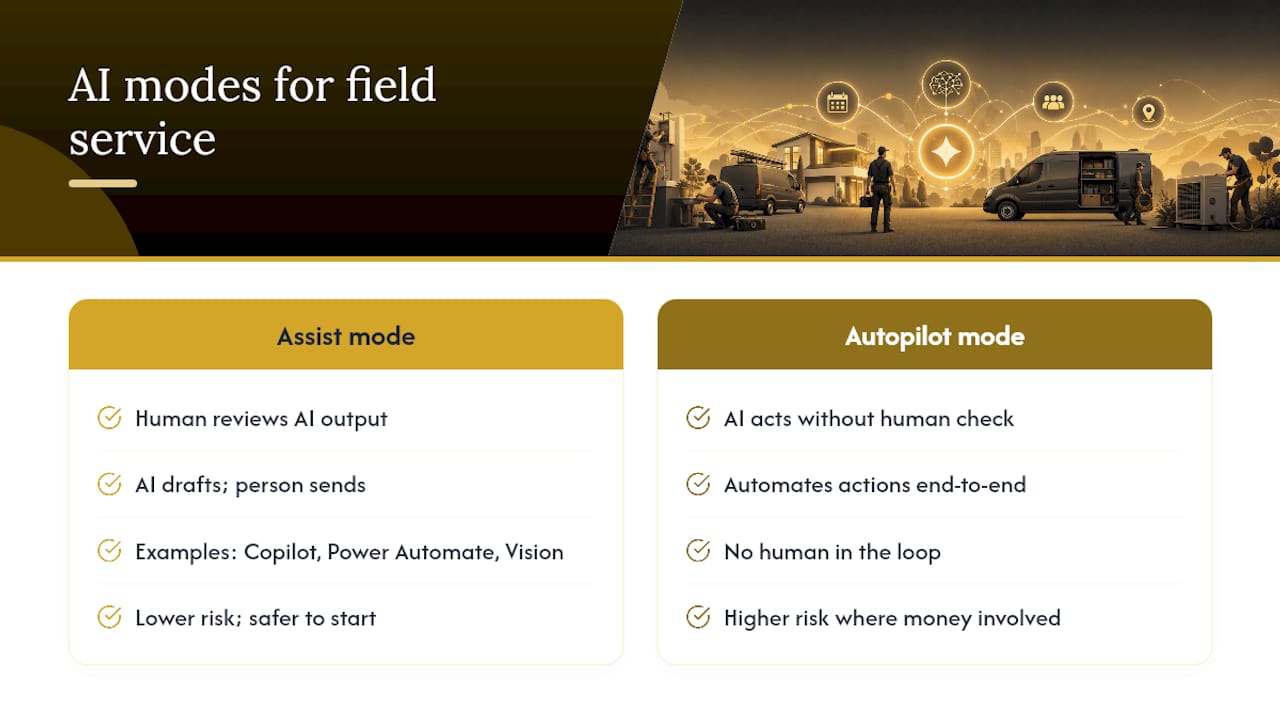
That difference matters more than most people realize. AI tools generally work in one of two modes: assist or autopilot. Assist mode means the AI drafts something, a person checks it, then it goes out. Autopilot means the AI acts on its own, with no human in the loop. For a small trades business, starting in assist mode is the safer call, especially anywhere money or customer promises are involved. You want the invoice draft, not the invoice sent without a look.
A few concrete examples show how this plays out. Microsoft’s Copilot features inside Dynamics 365 Field Service can auto-summarize work orders and support inspection templates, giving technicians a side-pane assistant instead of a blank form. Power Automate can trigger a draft invoice the moment a job gets marked complete. Azure’s vision tools can flag a corroded fitting or a cracked panel from a photo before a technician even climbs the ladder. None of these replace judgment. They just take the first draft off your plate.
Key use cases that actually save money
Field deployments consistently show the strongest returns in three areas: routing and scheduling, on-site diagnosis, and after-visit documentation. Here is how each one plays out on a real crew.
Dispatch and routing. Route optimization tools look at traffic, job location, technician skill, and parts on the truck, then build a schedule that cuts drive time. Reports on Canadian deployments put typical drive-time reductions in the 15 to 25 percent range once routing runs consistently. Multi-channel intake, where calls, texts, and web forms all land in one queue, also cuts the empty truck rolls that happen when a dispatcher misses a booking.
Predictive maintenance. This one needs data to work. If you track run hours, service history, or sensor readings on equipment you maintain, predictive tools can flag a compressor or pump likely to fail before it does. Without that data, skip it for now. It is not worth forcing.
On-site diagnostics. Photo-assisted checks let a technician snap a picture of a part and get a quick reference on what they are looking at. Paired with an LLM side-pane agent, a tech can ask “what’s the torque spec on this model” instead of digging through a binder in the truck. Image-assisted diagnosis works best as a second opinion, not a final word. Keep an escalation path to a senior tech for anything unusual.
Documentation and invoicing. A technician records a 90-second voice note at job end, and a Copilot-plus-automation flow turns it into a draft work order summary and invoice. Field reports suggest this is where techs recover the most time daily, often a substantial portion of their paperwork time after hours.

Intake and follow-up. An AI receptionist can answer after-hours calls and qualify leads instead of sending them to voicemail. Automated quote follow-ups catch the customer who never called back. Practitioner guides list after-hours answering, lead qualification, emergency triage, quote follow-up, and review collection as the five highest-return automations for contractors.
Pro Tip: Pick the one workflow costing you the most sleep, not the one that sounds most impressive. If invoicing is what keeps you at the kitchen table at 9 p.m., start there.
How to roll out AI without disrupting your crew
A rushed AI rollout usually fails for the same reason a rushed hiring decision fails: no clear plan for what success looks like. Here is a sequence that works for a small trades operation.
- Pick one high-payback workflow. Routing or documentation are the easiest wins. Define what success looks like before you start, such as “cut average drive time by 15 percent” or “cut invoice turnaround from five days to one.”
- Line up your integrations first. Your field service management (FSM) tool should stay the system of record. Connect it to your accounting software (QuickBooks or Xero), your calendar, your SMS or voice provider, and wherever photos get stored. AI tools that cannot see your real data will guess, and guessing costs you.
- Set a realistic timeline. A workable cadence looks like this: weeks 1 to 3 for governance and data setup, weeks 4 to 8 for a live pilot with one or two crews, and weeks 9 to 12 for a staged roll to the full fleet.
- Train hands-on, not by memo. Show technicians the tool doing their actual job, not a generic demo. Start every new automation in assist mode so people trust the output before it runs unsupervised.
- Appoint one owner. Someone on your team needs to be the point person for vendor questions, glitches, and feedback from the crew. Without an owner, small problems pile up and the pilot quietly dies.
Pro Tip: Run your pilot with your most tech-comfortable crew member first, not your most senior one. Early wins spread faster through the shop when they come from someone the team already asks for advice.
Data security and privacy: what to check before you sign
AI tools touch customer names, addresses, payment details, and photos of people’s homes and property. That is not the place to skip the fine print.
Ask any vendor where your data lives and whether it stays in Canada, since data residency and privacy rules can affect what you are allowed to promise customers. Get encryption and audit logging commitments in writing, not verbally on a sales call.
Permissions matter just as much as storage. Decide who on your team, or which AI tool, can actually take action versus just draft something for review.
- Require human approval before any AI-drafted invoice, refund, or payment change goes out.
- Restrict photo access so customer property images are not shared beyond the job file.
- Keep an audit trail of what the AI drafted, what a human changed, and who approved the final version.
- Build in a rollback process for the times an AI output is simply wrong, because it will happen occasionally.
Voice and chat agents need their own layer of caution. If a caller wants to change an address or ask about payment on file, verify who they are before the AI acts on it. Practitioner guidance on Canadian deployments recommends mandatory human handoff for anything touching payments or account changes, and that rule is worth following regardless of which tool you use. A well-governed voice agent should feel like a polite gatekeeper, not a decision-maker.
Measuring ROI: what 30 to 90 days should actually show
Before you launch anything, capture your baseline numbers: average drive time per job, minutes spent on paperwork per technician per day, quote-to-job conversion rate, and no-show rate for booked appointments. Without a baseline, you cannot prove anything worked.
Real deployments commonly report drive-time reductions of 15 to 25 percent, a first-time-fix rate that climbs by a handful of percentage points, and 45 to 90 minutes saved per technician per day on paperwork. To build your business case, multiply recovered hours by your billing rate, add in any extra bookings from faster follow-ups, then subtract your software and setup costs. If that number is positive within 90 days, the pilot earned its keep.
The most common blockers are dirty data (job histories scattered across three systems), missing integrations, and a crew that never got proper hands-on training. Fix those before blaming the AI.
Where a simple system-of-record fits into the picture
AI tools are only as good as the data they can see. If your customer details live in one app, your quotes in a spreadsheet, and your invoices in another tool entirely, no AI assistant can piece together an accurate picture. A central, simple system-of-record is what makes any AI layer worth the investment, because messy, scattered data quietly kills automation ROI before it starts.
This is where a tool like Forge fits. Forge keeps customers, quotes, work orders, and invoices in one place, so an AI layer drafting a follow-up email or a visit summary is working from real, current information instead of guessing. A technician finishes a job, the details already live in Forge, and a draft follow-up or invoice can be generated for someone to review, not rubber-stamped automatically.
A few starter automations pair naturally with a setup like this:
- AI-drafted follow-ups for open quotes that have gone quiet.
- Dictation-to-draft work order summaries a technician reviews before it becomes the official record.
- Triggered invoice drafts the moment a job status changes to complete.
| Starter automation | What it saves | Who approves it |
|---|---|---|
| Quote follow-up drafts | Lost bookings from forgotten quotes | Office admin |
| Voice note to work order summary | Paperwork time after each job | Technician |
| Job-complete invoice draft | Days between job finish and invoice sent | Owner or bookkeeper |
Human review stays part of every one of these steps. An AI-drafted invoice should never go out the door without someone’s eyes on it first.
The real challenges of putting AI to work in the field
None of this comes without friction, and it helps to know where before you start.
Data quality is the biggest one. If your job histories, customer notes, and pricing live across three disconnected tools, an AI assistant will produce confident-sounding nonsense instead of useful drafts. Fixing that usually means consolidating records before you add any AI on top, not after.
Technician buy-in is the second hurdle. A crew that has been burned by clunky software before will be skeptical of “one more app,” and rightly so. Tools that feel like extra typing get abandoned within weeks. The ones that stick are the ones that save time on day one, not the ones that promise to save time eventually.
Cost and complexity can also creep up fast. Enterprise-grade platforms built for large fleets often bring features and pricing that make no sense for a five-truck operation. Matching the tool to your actual scale matters more than picking the most advanced option on the market.
Finally, there is the trust gap. An AI-drafted invoice or diagnostic suggestion is a first draft, not a verdict. Crews and office staff both need training on when to trust the output and when to override it, and that habit takes weeks to build, not a single onboarding session.
Where Forge fits if you want cleaner data first
Every workflow in this guide works better when your customer, quote, and invoice records live in one place instead of three. That is the whole idea behind Forge: it keeps your customers, quotes, work orders, and invoices organized so you always know what needs attention next, without adding another complicated app to your day.
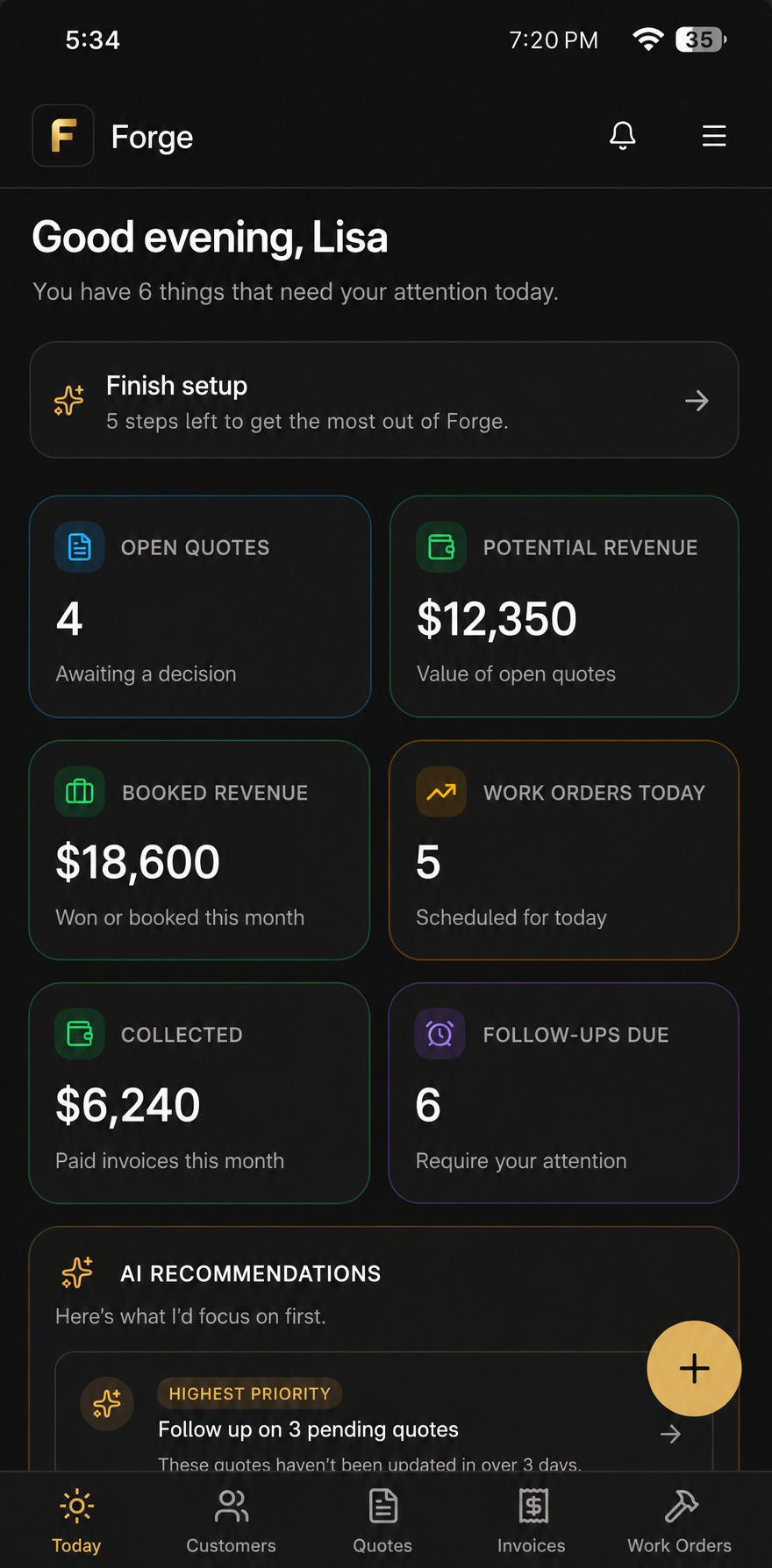
Forge does not replace your accounting software or hand you a fully automated shop overnight. It gives you a clear view of open quotes, unpaid invoices, and pending follow-ups so nothing falls through the cracks while you figure out what AI tools, if any, make sense to layer on top. For a five-truck HVAC crew running quotes off text messages and a notepad, that visibility alone often does more for your evenings than any AI tool will. If you want a simple starting point before you add automation, check out Forge’s plans and pricing and see how it fits your shop.
Sources
The Fusion Computing guide to AI in Canadian field services covers deployment timelines and governance practices in detail. Microsoft’s field service AI documentation explains Copilot’s work-order and diagnostic features. WebLaunch’s contractor workflow guide lists the highest-ROI automations for Canadian trades. For messaging and follow-up copy tactics, see this practical guide to AI-assisted copywriting.
- AI for Canadian Field Services: Dispatch, Diagnosis, and Documentation in 2026 — Fusion Computing
- How AI can give field service technicians a boost — Microsoft
- 5 AI workflows every Canadian contractor should automate in 2026 — WebLaunch
FAQ
What is the 30% rule in AI?
If you have heard the term used loosely, it usually refers to typical early efficiency gains reported in pilots, such as the 15 to 25 percent drive-time reductions seen in routing deployments, not a formal industry standard.
What is the best field service software?
There is no single best option for every shop. The right FSM tool depends on your crew size, your existing accounting setup, and how much you want to automate. A tool like Forge suits small trades owners who want one clear place to track customers, quotes, work orders, and invoices without a heavy enterprise system.
Which jobs will survive AI in field service?
Skilled diagnostic work, customer trust-building, complex on-site troubleshooting, and hands-on trade skills remain hard to automate. AI tools in this space are built to draft paperwork and suggest routes, not to replace the technician standing in front of a broken furnace.
Can you give an example of AI as a service in field service?
A dispatcher using an AI-driven scheduling tool that reroutes technicians in real time based on traffic and job priority is a common example. Another is a technician dictating a voice note that a Copilot-style tool turns into a draft work order summary for review, similar to the features Microsoft documents in Dynamics 365 Field Service.